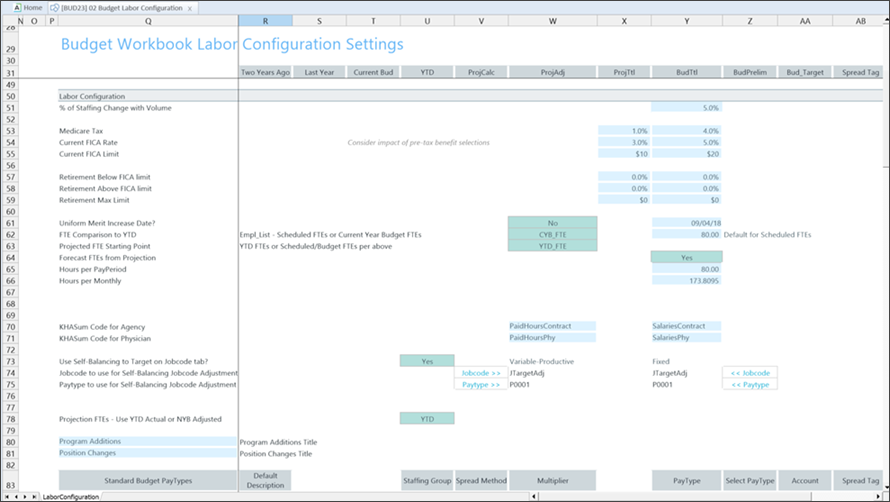
| % of Staffing Change with Volume |
The ratio of staffing to volume increases. |
| Medicare Tax |
The staff Medicare tax rate. |
| Current FICA Rate |
The FICA rate for staff. |
| Current FICA Limit |
The staff FICA limit for the calendar year. |
| Retirement Below FICA limit |
Retirement benefit rate used before the employee's salary exceeds the Current FICA limit amount.
For example, if the current FICA limit is $113,700, the resulting retirement benefit is calculated at 12%.
|
| Retirement Above FICA limit |
Retirement benefit rate used when the employee's salary exceeds the Current FICA limit amount, but does not exceed the Retirement Max Limit amount.
For example, an employee's salary increases to $125,000. As a result, the retirement benefit rate increases from 12% to 18%.
|
| Retirement Max Limit |
Maximum retirement benefit rate. |
| Uniform Merit Increase Date? |
Click Yes and add a date when merit increases become effective. Otherwise, click No. |
| FTE Comparison to YTD |
Select Scheduled FTEs (from Labor Master import) or CYB FTE – Current year budget FTEs from Payroll26. |
| Projected FTE Starting Point |
Select:
- YTD_FTE as the projected starting point.
- Sched/Budget to set the starting point as schedule and budget.
NOTE: To use CYB_FTE, run the Monthly to Biweekly report by accessing Reports Library > Management Reporting Utilities > Payroll to transfer your budgeted FTEs from the monthly payroll tables to the biweekly payroll tables. The default setting is Sched_FTE, which feeds from the Empl_List in the budget plan files.
|
| Forecast FTEs from Projection |
Select No to set the default budget FTEs to zero in all labor sheets (JobCode, Staffing and Employee). The default is Yes. |
| Hours per PayPeriod |
The number of hours in a pay period. The default is 80. |
| Hours per Monthly |
This option can be edited as needed. |
| KHASum Code for Agency |
Where contract labor appears on the Summary tab. Best practice inputs are PaidHoursContract/SalariesContract. |
| KHASum Code for Physician |
Where contract labor physician appears on the Summary tab. Best practice inputs are PaidHoursPhy/SalariesPhy. |
| Use Self-Balancing to Target on JobCode tab? |
When active, this option forces the department budget to a selected target on the Benchmark sheet. |
| JobCode to use for Self-Balancing JobCode Adjustment |
Job code for variable and fixed. |
| PayType to use for Self-Balancing JobCode Adjustment |
Pay type for variable and fixed. The default is the Regular pay type in the Standard Budget PayTypes Productive Categories section. |
| Account to use for Self-Balancing JobCode Adjustment |
Account for variable and fixed. The default is the "Regular" account in the Standard Budget PayTypes Productive Categories section. |
| Projection FTEs - Use YTD Actual or NYB Adjusted |
Base the Projected FTE allocation from YTD or NYB. If adjustments are present in the yellow allocation rows from the base YTD calculation, you can make that same assumption for the Projected FTE.
For example, assume that the year-to-date percentage (YTD%) for overtime was 4% YTD. The projection would also be 4% and would calculate the overtime FTE accordingly. However, if you made an 8% adjustment to overtime allocation, that 8% adjustment could also apply to the Projection FTE rather than just to NYB.
|
| Program Additions |
Add a custom name for the Program Additions row. Type the new name in the cell to the left of the label. This row does not include merit and market increases. |
| Position Changes |
Add a custom name for the Position Changes row. Type the new name in the cell to the left of the label. This row does include merit and market increases. |